Keyword research can quickly become difficult when your list grows from a few dozen terms to thousands of search queries. Looking at every keyword individually makes it harder to identify common themes, understand search intent, and decide which terms should be targeted on the same page.
Keyword clustering solves this problem by organizing related search terms into meaningful groups. With Python, SEO professionals can automate much of this process and create topic clusters from large keyword datasets.
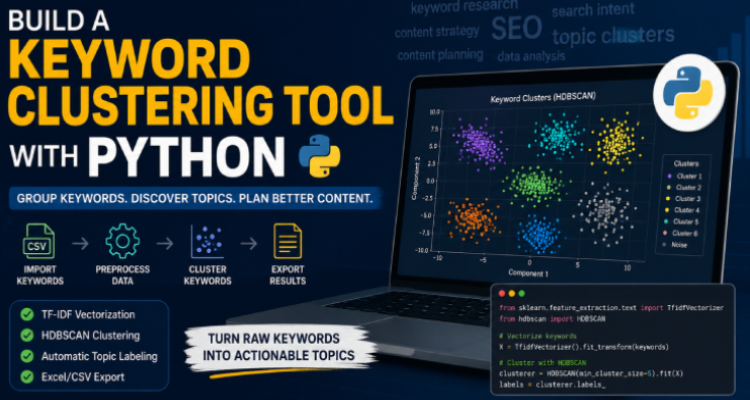
This guide explains how a Python-based keyword clustering workflow can help you organize keywords, using TF-IDF for text representation and HDBSCAN for discovering natural groups within the data. The approach can also be connected with Google Search Console and BigQuery to create a scalable SEO research workflow.
What Is Keyword Clustering?
Keyword clustering is the process of grouping search queries that are closely related by topic, meaning, or search intent.
For example, an SEO project might contain keywords such as:
- best WordPress hosting
- WordPress hosting services
- affordable WordPress hosting
- fastest hosting for WordPress
- WordPress hosting for small businesses
Instead of creating a separate page for every variation, clustering can reveal that these queries belong to a broader topic around WordPress hosting.
This can make content planning more efficient because one well-structured page may address several closely related searches.
Keyword clustering can also support:
Content planning
Topic mapping
Internal linking
Topical authority
Search intent analysis
Content consolidation
SEO information architecture
The bigger the keyword dataset, the more valuable automation becomes.
Why Manual Keyword Grouping Doesn’t Scale
Manually sorting keywords may work for a small project, but it becomes extremely time-consuming when you are dealing with thousands of queries.
Large keyword exports often contain spelling variations, duplicate concepts, unnecessary symbols, stopwords, and highly specific long-tail searches. Simply looking for matching words is not enough because related keywords do not always use exactly the same vocabulary.
This is where a programmatic workflow becomes useful.
Python can automate the repetitive stages of the process, including cleaning keywords, converting text into numerical representations, discovering clusters, and exporting the final results.
The Python Approach to Keyword Clustering
A practical keyword clustering workflow can be divided into several stages:
- Collect your keyword data.
- Clean and normalize the keyword list.
- Convert keywords into numerical vectors.
- Identify natural groups.
- Separate unrelated or unusual keywords.
- Label each cluster.
- Export the results for SEO analysis.
Two important components of this process are TF-IDF and HDBSCAN.
Using TF-IDF to Understand Keyword Importance
TF-IDF stands for Term Frequency-Inverse Document Frequency.
In simple terms, TF-IDF helps identify which words are more distinctive within a collection of keyword phrases.
A word that appears in almost every keyword is usually less useful for distinguishing one topic from another. Conversely, a term that appears in only a smaller group of related queries can provide a stronger signal about that topic.
For example, imagine a dataset containing hundreds of queries about different types of digital marketing. Generic words such as “marketing” may appear repeatedly, while more specific terms such as “technical SEO,” “local SEO,” or “email automation” can help distinguish individual groups.
TF-IDF converts each keyword into a numerical representation that a clustering algorithm can process.
Why HDBSCAN Can Be Useful
One challenge in keyword clustering is that you may not know how many topic groups exist before analyzing your dataset.
Traditional algorithms such as K-means require you to choose the number of clusters in advance. That can be inconvenient for SEO datasets because the ideal number of topic groups isn’t always obvious.
HDBSCAN, or Hierarchical Density-Based Spatial Clustering of Applications with Noise, takes a different approach.
It looks for dense groups within the data and can identify clusters without requiring you to specify the exact number beforehand.
Another benefit is its ability to identify outliers. Instead of forcing every keyword into a category, HDBSCAN can mark terms that do not clearly belong to a cluster as noise.
This can be particularly helpful with long-tail keywords.
For example, a dataset might contain:
- hundreds of searches about “SEO tools”
- dozens about “free SEO tools”
- several about “SEO tools for ecommerce”
- one highly unusual query that has no close relationship with the rest
Rather than damaging the quality of the main groups, the unusual query can remain separate.
Cleaning Your Keyword Dataset
Before clustering begins, data preparation is essential.
Keyword exports can contain duplicate entries, punctuation, special characters, stopwords, and other unnecessary elements. Cleaning the dataset can improve the quality of the resulting clusters.
A basic preprocessing workflow may include:
Removing duplicates: Duplicate keywords can distort the dataset.
Normalizing text: Converting terms into a consistent format makes comparisons easier.
Filtering unnecessary characters: Special or non-standard characters may introduce noise.
Removing stopwords where appropriate: Common words may provide little value for topic discovery.
Handling language-specific data: If your clustering model is designed for English keywords, non-English queries may need to be filtered or processed separately.
Python makes these tasks repeatable, which is much more practical than manually cleaning a large spreadsheet.
Getting Keywords from Google Search Console and BigQuery
The clustering tool needs a keyword list as its input.
One useful source is Google Search Console. For larger datasets, Search Console data exported to BigQuery can provide a more scalable source for analysis.
A typical workflow could look like this:
Google Search Console → BigQuery → Keyword extraction → Python clustering → Excel report
The resulting query data can then be exported into a simple text file containing one keyword per line.
This separation keeps the clustering process straightforward: the Python workflow doesn’t need to know where the keywords came from; it simply processes the supplied list.
Search Console’s interface can still be used when BigQuery is not available, although the available dataset may be more limited.
Making the Clustering Tool Adjustable
One of the most useful improvements to a keyword clustering script is allowing users to modify the main clustering settings without changing the underlying code.
For example, two important variables can be exposed:
Sensitivity
This controls how easily the algorithm identifies groups within the dataset.
A highly sensitive configuration may produce more clusters, while a less sensitive setup may create broader groups.
Minimum Cluster Size
This determines approximately how large a group needs to be before it is treated as a meaningful cluster.
A dataset containing 50 keywords may need very different settings from a dataset containing 50,000 keywords.
Making these values configurable allows the same Python workflow to be reused across different SEO projects.
Google Colab Makes Experimentation Easier
A Python clustering workflow can also be adapted for Google Colab.
Colab is useful because users can run Python notebooks in a browser without setting up a complete local development environment.
It also makes it easier to experiment with different parameters and generate visualizations.
A practical workflow could be:
- Open the notebook.
- Upload the keyword file.
- Run the preprocessing steps.
- Adjust clustering parameters.
- Review the results.
- Export the final dataset.
For SEO teams, this can be more convenient than maintaining a command-line application, especially when the goal is analysis rather than software development.
Automatically Labeling Keyword Clusters
Creating groups is only part of the problem. SEO teams also need to understand what each cluster represents.
A useful system can generate a label for each cluster based on its most relevant or distinctive terms.
For example:
Cluster – Example Keyword – Suggested Topic
1. best seo tools, seo software, seo platforms – SEO Tools
2. local seo services, local seo company, local search optimization – Local SEO
3. wordpress hosting, best hosting for wordpress – WordPress Hosting
These labels can make large datasets much easier to review.
However, automated labels should be considered starting points rather than final editorial decisions.
Exporting the Results
Once clustering is complete, the output can be exported into a spreadsheet such as Excel.
A useful report can contain both a high-level cluster summary and the individual keyword assignments.
For example:
Cluster Overview
- Cluster number
- Cluster label
- Number of keywords
- Primary topic
Keyword Details
- Original keyword
- Assigned cluster
- Cluster score or confidence
- Related topic
This format allows an SEO specialist or content strategist to inspect the data and turn clusters into an actionable content plan.
How AI Can Improve the Development Process
AI can be useful when building or improving a keyword clustering tool, particularly for repetitive development work.
For example, AI can help with:
- Creating Python boilerplate
- Connecting libraries
- Refactoring older scripts
- Adding configurable parameters
- Improving error handling
- Adapting scripts for Google Colab
- Building visualizations
- Formatting output files
However, AI does not remove the need for SEO knowledge.
Someone still needs to decide whether the clustering approach makes sense, whether the groups match search intent, and whether multiple keyword clusters should actually be targeted by separate pages.
The technology can speed up implementation, but human judgment remains essential.
Benefits of Automated Keyword Clustering
An automated clustering system can provide several advantages for SEO campaigns.
Saves Time
Instead of manually sorting thousands of queries, a script can process the dataset automatically.
Supports Large SEO Projects
The same framework can be reused for websites with hundreds, thousands, or significantly larger keyword lists.
Creates Better Topic Structures
Grouping related search queries can reveal broader content themes that may not be obvious from individual keywords.
Identifies Outliers
Noise detection can prevent unusual keywords from being incorrectly forced into unrelated topic groups.
Improves Content Planning
Keyword clusters can become the foundation for content briefs, topic maps, and editorial calendars.
Don’t Treat Automated Clusters as Final SEO Decisions
Automation is powerful, but clustering should not be the final step.
Two keywords can be semantically similar while still having different search intent. Likewise, two phrases that appear different can sometimes be satisfied by the same page.
After generating clusters, review them manually.
Ask:
- Do the keywords share the same search intent?
- Would users expect the same type of content?
- Should these terms be targeted by one page or multiple pages?
- Are commercial and informational queries mixed together?
- Does the proposed topic make sense for the website?
The best workflow combines machine-assisted organization with human SEO judgment.
Final Thoughts
Keyword clustering with Python can turn a messy keyword spreadsheet into a much more useful SEO research asset.
By cleaning search queries, representing them with TF-IDF, and using a density-based algorithm such as HDBSCAN, marketers can discover natural topic groups without manually sorting every keyword. Connecting the workflow with Google Search Console and BigQuery can make the process even more scalable.
The biggest advantage isn’t simply automation. It is the ability to shift from thinking about hundreds of individual keywords to thinking about topics, search intent, and content opportunities.
For SEO teams managing large keyword databases, a Python-based clustering workflow can provide a faster and more structured starting point for building content strategies, improving internal linking, and developing stronger topical coverage.